Notifications help you stay updated about project-related activity. You can customise which notifications you receive for your user account and choose how you receive them.
Notification preferences are available for features such as tasks, messages, documents, forms, project updates, timesheets, and project dates.
You can also configure reminders for upcoming task start dates and due dates.
Accessing notification settings
You can access Notification Settings in two ways.
From Notifications
- Click the bell icon in the left navigation bar.

- Click the Configure icon from the Notifications view.

From Settings
- Go to Settings from the left navigation bar.

- Click Notifications.

The Notification Settings page lets you customise your notification preferences.
Notification types
Depending on the notification, you can receive updates through email, in-app notifications, or Slack.

NoteTo clear all notifications, click Clear All in the Notifications pane. To restore cleared notifications, open Cleared Notifications and click Restore.


Feature-based notification settings
Notification settings are grouped by feature. You can enable or disable the available notification channels based on the updates you want to receive.
The following tables show the available notifications and their default settings.
Note✅ indicates a notification that is enabled by default. ☑️ indicates a notification that cannot be unsubscribed from.
Messages
| Notification | Email | In-app | Slack |
|---|
| New messages in tasks or documents that I follow | | ✅ | |
| Messages mentioning me | ✅ | ☑️ | ☑️ |
| Message reactions | ✅ | ✅ | ✅ |
| Someone replies to my messages | ✅ | ☑️ | ☑️ |
Tasks
| Notification | Email | In-app | Slack |
|---|
| New tasks created |
| Notify me and follow all tasks created in the projects that I'm a part of | | ✅ | |
| Notify me when new tasks are created in the projects that I'm a part of | | ✅ | |
| Do not notify | | | |
| Status changed | ✅ | ✅ | |
| Task is assigned to me | ✅ | ☑️ | ☑️ |
| I'm mentioned in a task | ✅ | ☑️ | ☑️ |
| Assignee changed | | ✅ | |
| Dependency changes | | ✅ | |
| Priority changed | | ✅ | |
| Task estimates changed | | ✅ | |
| Attachment is added to the task | | ✅ | ☑️ |
| Task name or description changed | | ✅ | |
| Custom field changed | | ✅ | |
Sheets
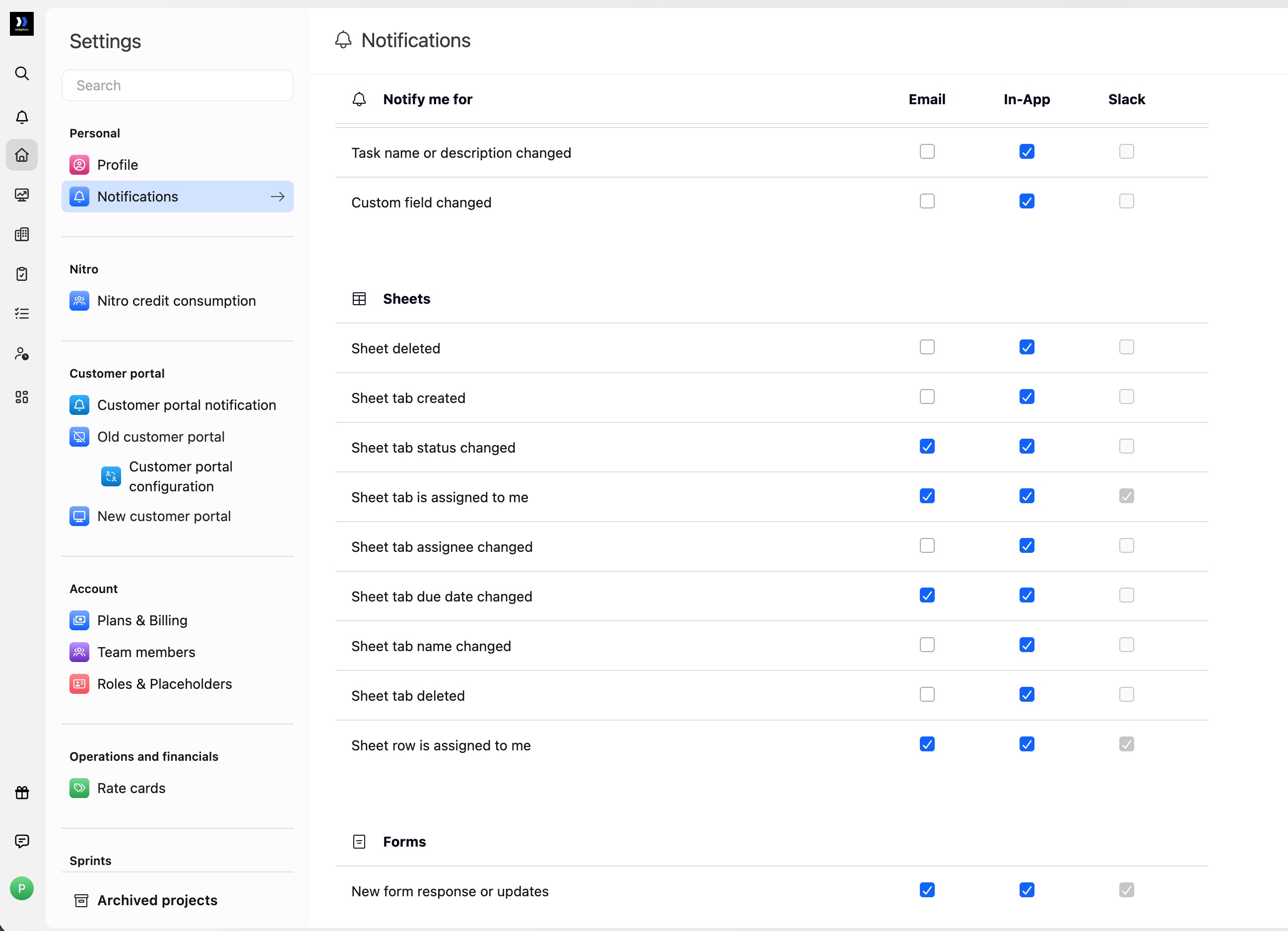
Sheets notifications keep you informed about changes to sheets, tabs, and row assignments in projects you belong to.
| Notification | Email | In-app | Slack |
|---|
| Sheet deleted | | ✅ | |
| Sheet tab created | | ✅ | |
| Sheet tab status changed | ✅ | ✅ | |
| Sheet tab is assigned to me | ✅ | ✅ | ✅ |
| Sheet tab assignee changed | | ✅ | |
| Sheet tab due date changed | ✅ | ✅ | |
| Sheet tab name changed | | ✅ | |
| Sheet tab deleted | | ✅ | |
| Sheet row is assigned to me | ✅ | ✅ | ✅ |
NoteCreating a sheet or changing the sheet's own status, assignee, or due date is covered by the Tasks notification settings. The Sheets section covers sheet deletion and changes to tabs and rows. Comments and mentions inside sheet cells are controlled under Messages, not Sheets. Slack checkboxes remain unavailable until the Slack integration is configured. Sheets notifications are delivered as Slack direct messages and cannot currently be sent to Slack channels.
The two assigned to me events notify only the person being assigned. All other Sheets events notify project members except the person who made the change. You receive a notification only if you are a project member and have permission to view the sheet. None of the Sheets notifications are mandatory.
| Notification | Email | In-app | Slack |
|---|
| New form response or updates | ✅ | ✅ | ☑️ |
Documents
| Notification | Email | In-app | Slack |
|---|
| New document is created |
| Notify me and follow all documents created in projects that I'm a part of | ✅ | ✅ | |
| Notify me when new documents are created in projects that I'm a part of | ✅ | ✅ | ☑️ |
| Do not notify | ✅ | ✅ | ✅ |
| I'm mentioned in a document | ✅ | ☑️ | ☑️ |
Phases
| Notification | Email | In-app | Slack |
|---|
| Notify me when a phase is added or deleted and when its status changes | ✅ | ✅ | ☑️ |
| Phase start date or due date is changed | ✅ | ✅ | ✅ |
Projects
| Notification | Email | In-app | Slack |
|---|
| Project status is changed | ✅ | ☑️ | ✅ |
| Project start date or due date is changed | ✅ | ✅ | ✅ |
Project updates
| Notification | Email | In-app | Slack |
|---|
| Project update is published | ☑️ | ✅ | ✅ |
Timesheets
Timesheet notifications keep submitters informed about reminders and approval outcomes, while notifying approvers when a timesheet requires review. Email and in-app notifications are enabled by default. You can turn off individual notifications that you do not want to receive.
Timesheet submission notifications
These notifications are sent to the person submitting the timesheet.
| Notification | When it is sent | Email | In-app |
|---|
| Timesheet submission reminder | Before the timesheet due date | ✅ | ✅ |
| Timesheet overdue reminder | After the due date if the timesheet has not been submitted | ✅ | ✅ |
| Timesheet approved | When an approver approves the timesheet | ✅ | ✅ |
| Timesheet rejected | When an approver rejects the timesheet | ✅ | ✅ |
Timesheet approval notifications
These notifications are sent to timesheet approvers.
| Notification | When it is sent | Email | In-app |
|---|
| Timesheet approval requested | When a timesheet is submitted for the approver's review | ✅ | ✅ |
NoteThe due date and timing of submission and overdue reminders are configured separately by an admin under Settings > Time Tracking. Your notification preferences determine whether you receive those reminders but do not change when they are scheduled.
NoteTurning off a timesheet notification affects only your own notification preferences. It does not change the timesheet submission or approval workflow for other users.
Dates
| Notification | Email | In-app | Slack |
|---|
| Start date changes |
| Tasks I'm assigned to | ✅ | ✅ | ☑️ |
| All tasks on projects I'm a part of | ✅ | ✅ | |
| Due date changes |
| Tasks I'm assigned to | ✅ | ✅ | ☑️ |
| All tasks on projects I'm a part of | ✅ | ✅ | |
| Due date overdue |
| Tasks I'm assigned to | ✅ | ✅ | ☑️ |
| All tasks on projects I'm a part of | ✅ | ✅ | |
Reminders
Reminders let you choose how far in advance you want to be notified about a task's start date or due date. Available reminder timings: same day, 1 day before, 2 days before, 3 days before, or 1 week before.
| Notification | Email | In-app | Slack |
|---|
| Start date |
| Tasks I'm assigned to | | ✅ | |
| All tasks on projects I'm a part of | | ✅ | |
| Due date |
| Tasks I'm assigned to | ✅ | ✅ | |
| All tasks on projects I'm a part of | ✅ | ✅ | |