When you work on a project with a customer, some documents are meant only for your team, such as internal notes or handover checklists, while others need to be visible to the customer. Keeping both kinds of content in one place makes it easy to share the wrong file by mistake.
Private and shared spaces in Rocketlane give you control over the privacy of your documents and files. You choose what information to share with your customers and what to keep exclusively with your team. This makes it easier to work with both your team and your customers on the same project.
In this article
Accessing private and shared spaces from a project
Default spaces in a new project
Accessing private and shared spaces from a project
Go to the Spaces tab of a project. The left panel lists your spaces under two headings, Private spaces and Shared spaces. Each space works like a folder that holds documents.
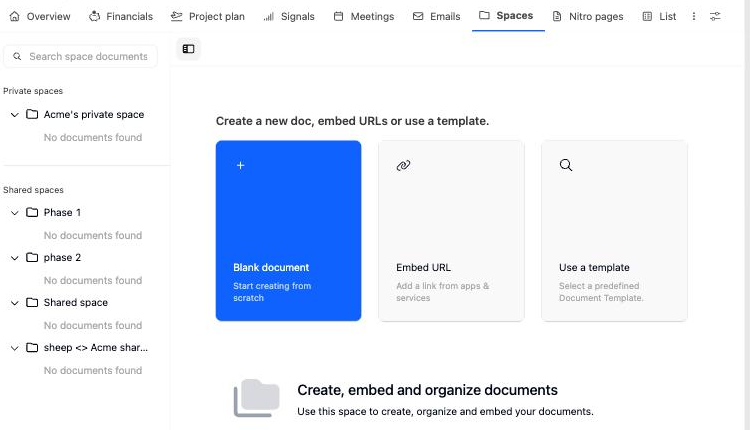
To find a document quickly, type part of its title in Search space documents at the top of the left panel. The list filters both private and shared spaces as you type.
Default spaces in a new project
When you create a project that does not get its spaces from a project template, Rocketlane adds two spaces for you:
| Default space | Name format | Example |
|---|---|---|
| Private space | Your company name's private space | Acme's private space |
| Shared space | Customer company name <> Your company name shared space | Globex <> Acme shared space |
If the project template already includes spaces, the project uses the template's spaces and their names instead. When you set up spaces in a project template, Rocketlane starts the template with Your company name's private space and a space named Shared space, which you can rename in the template.
Private spaces
Private spaces hold files that only your team can see. Use them to share files and project-related information exclusively with your team and not your customers.
Each private space is a folder that holds documents. You can create several private spaces to categorize your content, for example one for internal meeting notes and another for pricing or handover material.
The default private space is named after your company, because its content is visible only to team members from your organization. You can rename it.

Private spaces: functionalities
| Action | Where to find it | What it does |
|---|---|---|
| Collapse all / Expand all | Icon next to the Private spaces heading | Collapses or expands every private space in the list. |
| Add private space | + icon next to the Private spaces heading | Adds a new private space. Type a name and press Enter. Press Esc, or leave the name blank, to cancel. |
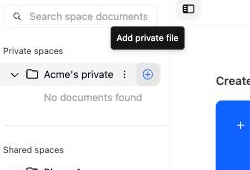
| Add private file | + icon next to a space name | Opens the options to create a blank document, embed a URL, or use a template in that space. |
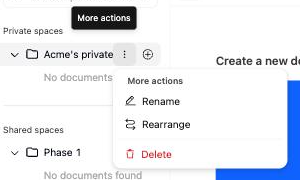
| Rename | Space's More actions menu | Lets you edit the space name in place. Press Enter to save or Esc to cancel. |
| Rearrange | Space's More actions menu | Opens Rearrange documents, where you can drag spaces and documents into a new order. For details, see Rearranging spaces and moving documents between them. |
| Delete | Space's More actions menu | Permanently deletes the space and every document and embed inside it. |
Shared spaces
Shared spaces hold files that both your team and your customer can see. Use them to share files and project-related information with your team as well as your customers.
Each shared space is a folder that holds documents. You can create several shared spaces to categorize your content, for example one for kickoff material and another for requirements or training documents.
The default shared space is named after your customer's company and your company, in the format Customer company name <> Your company name shared space. You can rename it.

Shared spaces: functionalities
| Action | Where to find it | What it does |
|---|---|---|
| Collapse all / Expand all | Icon next to the Shared spaces heading | Collapses or expands every shared space in the list. |
| Add shared space | + icon next to the Shared spaces heading | Adds a new shared space. Type a name and press Enter. Press Esc, or leave the name blank, to cancel. |
| Add shared file | + icon next to a space name | Opens the options to create a blank document, embed a URL, or use a template in that space. |
| Rename | Space's More actions menu | Lets you edit the space name in place. Press Enter to save or Esc to cancel. |
| Rearrange | Space's More actions menu | Opens Rearrange documents, where you can drag spaces and documents into a new order. For details, see Rearranging spaces and moving documents between them. |
| Delete | Space's More actions menu | Permanently deletes the space and every document and embed inside it. |
Rearranging spaces and moving documents between them
As a project grows, documents often end up in the wrong space, or a draft that started as internal becomes ready to share with the customer. You can reorder spaces and move documents without recreating them.
- In the project's Spaces tab, hover over any space or document in the left panel and click More actions.
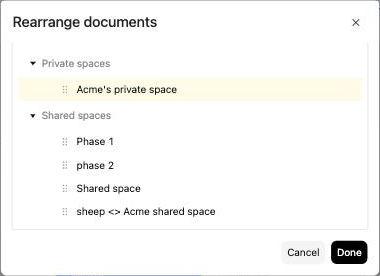
- Click Rearrange. The Rearrange documents window opens, showing Private spaces and Shared spaces.
- Drag a document to a new position or into a different space. Drag a space to reorder it within its group.
- Click Done to save the new order, or Cancel to discard your changes.
Things to know
- Moving a document from a private space into a shared space makes it visible to your customer. Rocketlane shows a Document Moved message confirming the move.
- A space stays private or shared. You cannot drag a private space into the shared group, or a shared space into the private group.
- Documents must sit inside a space. You cannot place a document at the same level as a space.
- The Rearrange option appears only for users whose permission set includes Can rearrange documents.
Deleting a space
Delete a space when you no longer need it or its documents. Deleting a space also deletes every document and embed inside it.
- In the project's Spaces tab, hover over the space in the left panel and click More actions.
- Click Delete.
- In the Delete space dialog, click Delete to confirm, or Cancel to keep the space.
The dialog warns that all documents and embeds in the space will be deleted and cannot be recovered. To keep any of them, use Rearrange to move them into another space first.
The Delete option appears only for users whose permission set includes Can delete a space.
FAQ
Why can't I see the + icon to add a space?
The + icon only appears if your permission set allows you to create that type of space. A permission set can allow private spaces only, shared spaces only, or both. Ask your admin to check the Spaces section of your project permissions.
Can I turn a private space into a shared space?
No. Create a shared space and move the documents into it using Rearrange. Moved documents become visible to your customer.
Can I get a space back after deleting it?
No. Deleting a space permanently removes the space and all documents and embeds inside it.
Why does my new project have different space names from the ones in this article?
The default names apply only to projects that do not get their spaces from a project template. If your project was created from a template that includes spaces, it uses the template's spaces and names. Spaces can also be renamed at any time.
Summary
- Private spaces are visible only to your team. Shared spaces are visible to your team and your customer.
- New projects without template spaces get one private and one shared space, named after your company and your customer.
- Use More actions on a space to rename, rearrange, or delete it.
- Moving a document into a shared space exposes it to your customer.
- Deleting a space permanently deletes everything in it.